How to Train AI Writing Tools to Follow Your Content Style Guide
Last updated: 14 October 2026
Training AI writing tools to follow your content style guide requires feeding the model your brand voice, tone rules, and formatting preferences as structured prompts or fine-tuning data. Most tools accept style guidelines through system instructions, example outputs, or custom training datasets that show the AI what good looks like for your brand. The challenge is balancing specificity (detailed rules help) against over-constraint (too many rules confuse the model). Start by documenting your five to ten core style principles, then test them against the tool's output to see what sticks and what needs refinement.
What you'll build: a five-layer system that keeps AI writing tools on-brand across sessions, writers, and tools, from encoded style rules to automated audit loops that catch drift before it reaches a reviewer.
The core problem is session memory. Paste your style guide into a prompt once, and the AI follows it for that conversation. Open a new tab, and the context is gone. A Reddit thread on prompt engineering captures this frustration exactly: writers feed GPT-4 multiple essays to capture their voice, only to find the model reverts to generic patterns the moment the session resets.
This guide walks you through how to train a content style guide into AI writing tools in a way that actually holds across sessions. The five layers below address the memory problem directly:
- A structured style rule document the AI can ingest reliably
- A voice sample library that grounds abstract rules in concrete examples
- A persistent system prompt architecture for tools that support it
- A human-readable checklist for editors to verify AI output against your guide
- A feedback loop that updates the system when drift is caught
One honest caveat up front: no setup eliminates all drift. Harvard's AI basics guidance notes that AI tools require ongoing prompt refinement, not a one-time configuration. The system here reduces rework significantly, but it needs a quarterly review pass to stay calibrated.
Before You Start: Three Things to Have Ready
You need three foundational elements before training your style guide into AI: a documented style guide covering tone and mechanics, access to an AI tool with persistent system prompts or custom instructions, and 5 to 10 curated brand content samples that exemplify your voice at its best.
Your style guide does not need to be perfect. A rough document covering tone, sentence length preferences, banned phrases, and formatting rules is enough to start. If your guide lives in a 40-page PDF with brand history and logo specs mixed in, extract the writing-specific rules into a separate plain text or markdown file. AI tools parse structured text far more reliably than dense formatted documents, and keeping it lean means you can paste it directly into a system prompt without hitting token limits.
The AI tool you choose matters more than most teams expect. You need one that accepts either a persistent system prompt or a custom instructions field, not just a chat interface where context resets every session. GPT-4o and Claude are the two most production-tested options right now, both supporting multi-thousand-word system prompts where you can embed your full style rules. Tools without this layer force you to re-paste context every session, which breaks consistency at scale.
Your reference content is the most underestimated input. Pull 5 to 10 pieces your team considers genuinely on-brand: a blog post, a product page, an email, a case study. Variety across formats matters because brand voice often shifts slightly by channel, and you want the AI to learn those shifts rather than flatten them. As one practitioner put it in a detailed breakdown on AI content workflows: "Stop collecting prompts and start building your context." The reference samples are your context.
There is a real trade-off here. If your existing content is inconsistent, training on it will teach the AI your inconsistencies too. Teams that have published across multiple writers over several years often find their "approved" archive contains two or three distinct voices. In that case, curating the reference set takes longer than expected, and skipping that curation step produces an AI that confidently writes in a blended, averaged voice that matches nothing you've actually published. Be selective: pick pieces written or heavily edited by the person whose voice you most want to replicate, not just anything that went live.
Before moving forward, confirm your style guide covers at least these five areas:
| Style guide area | What to document |
|---|---|
| Tone and register | Formal, conversational, technical-casual, etc. |
| Sentence and paragraph length | Average word count per sentence, max paragraph lines |
| Banned phrases or words | Cliches, competitor names, internal jargon to avoid |
| Formatting rules | Heading style, use of bold, bullet list conventions |
| Vocabulary preferences | Preferred terms vs. alternatives (e.g. "use" not "utilize") |
If your guide does not cover at least four of these five, the AI will fill the gaps with its own defaults. Those defaults are trained on the internet at large, not on your brand.
Step 1: Understand Why Standard Prompts Fail to Lock In Brand Style
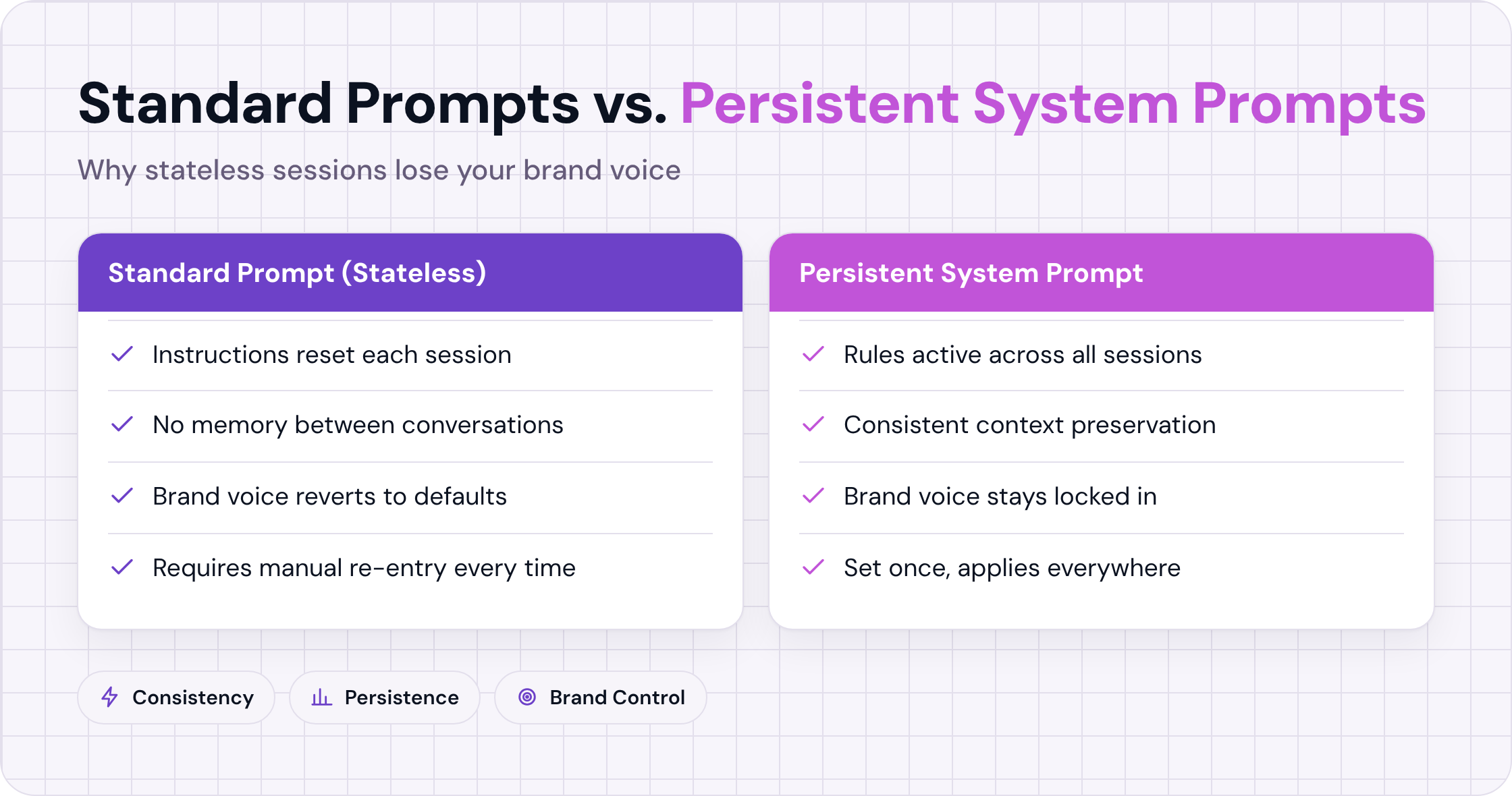
Standard prompts fail to preserve brand style because most AI writing tools are stateless by default. Each new session starts with no memory of the instructions you gave yesterday. A one-shot style instruction, pasted at the top of a single conversation, shapes that session's output and nothing else. Without a persistent style layer built into the system prompt or a dedicated configuration file, the model reverts to its training defaults the moment the session closes.
Stateless Sessions and the Memory Problem
Most consumer-facing AI tools, including the chat interfaces teams use daily, do not carry context between conversations. You write "use short sentences, avoid jargon, and never use passive voice," the model complies for that session, and then the slate is wiped. The next writer on your team opens a fresh tab and gets a model with no recollection of those rules.
This is a structural constraint, not a bug you can prompt your way around. Every.to's AI style guide resource frames the core problem clearly: teams confuse a one-time instruction with a repeatable system. The instruction is a request. The system is what enforces it across every draft, every writer, and every session.
One-Shot Instruction vs. a Persistent Style Layer
A one-shot instruction lives in the chat window. A persistent style layer lives in the system prompt, a saved configuration, or a structured document that gets injected at the start of every generation request. The difference is reproducibility.
One-shot instructions work well for a single writer doing a single task. They break down the moment a second writer joins, or when the same writer returns to the tool two days later. At that point, style consistency depends entirely on human memory, which is not a reliable system.
Three Specific Failure Modes
When style context is not persistent, three failure patterns appear consistently.
Tone drift is the most common. The model starts a piece in your preferred register, then gradually shifts toward its statistical default: smoother, more neutral, more corporate. By paragraph four, the voice sounds like a press release.
Vocabulary substitution is subtler. Your style guide says "customers," the model writes "users." Your guide says "build," the model writes "develop" or "implement." Each swap is individually defensible, but collectively they erode the voice. A team at a mid-size SaaS company tracking this manually found over 40 substituted terms across a single five-article batch, none of them flagged by any reviewer.
Structural deviation is the hardest to catch. Your guide specifies short paragraphs, no bullet lists in thought-leadership pieces, and answer-first openings. The model produces long paragraphs, three-item bullets, and context-first framing. The content is accurate. The structure is wrong. Readers notice even when they cannot name what changed.
One trade-off worth acknowledging: even a well-built persistent style layer will not catch every deviation. Models still interpolate between your examples and their training data, and the balance shifts depending on prompt length, model version, and how ambiguous your style rules are. Highly abstract guidance ("sound human") produces more drift than concrete rules ("sentences under 20 words, no passive constructions"). The more specific your constraints, the more the persistent layer actually holds.
Step 2: Build a Machine-Readable Style Guide
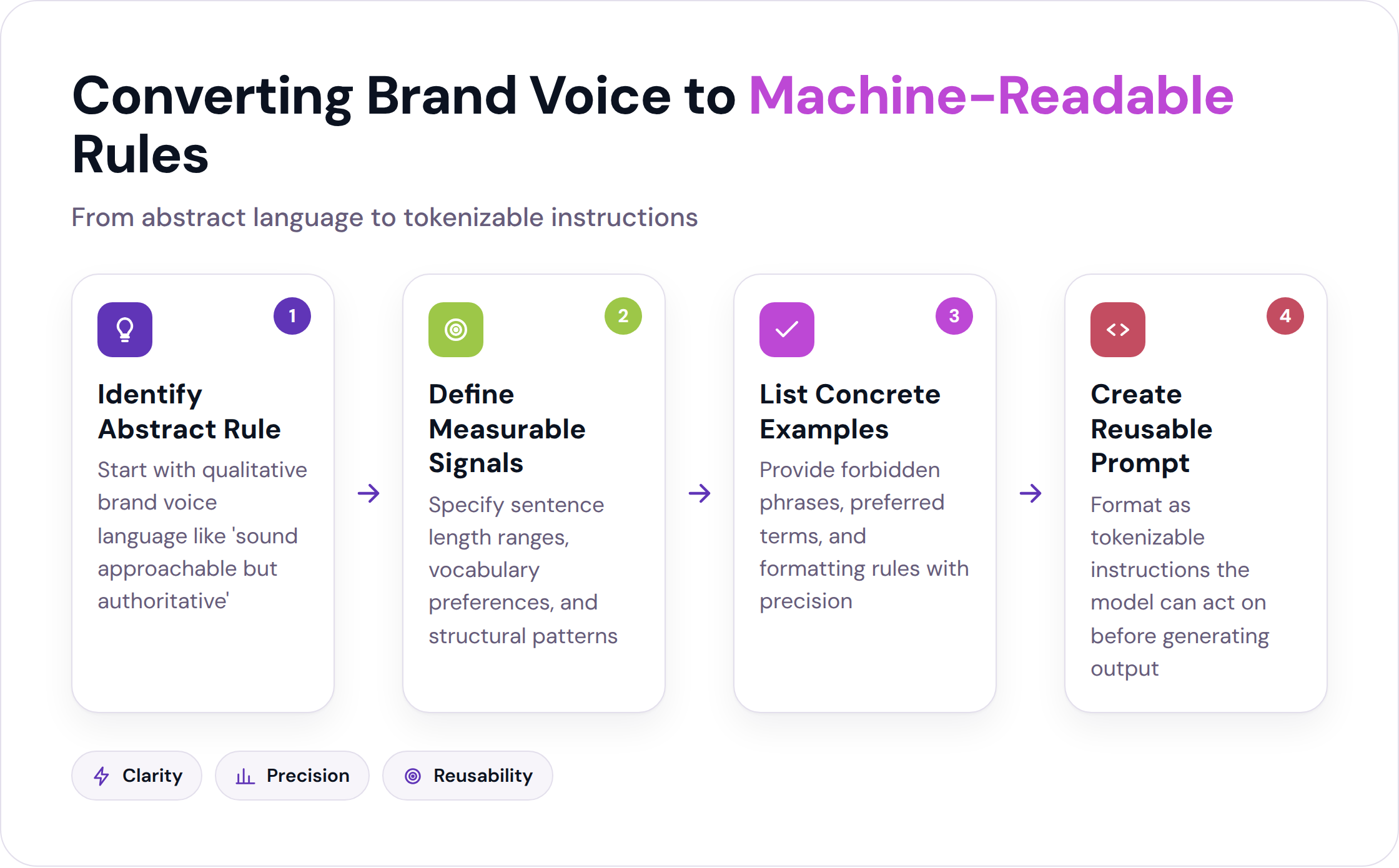
A machine-readable style guide converts your brand's writing rules into structured, tokenizable instructions a language model can act on before generating a single word. Instead of describing tone in abstract terms, it specifies sentence length ranges, lists forbidden phrases, names preferred vocabulary, and defines paragraph structure with enough precision that the model has little room to interpret freely. Done right, it functions as a reusable system prompt you paste at the start of every session.
Converting Human Rules into Model Instructions
Most brand voice documents use language like "sound approachable but authoritative." That phrase means something to an experienced editor. To a language model, it means almost nothing, because there is no measurable signal to follow.
The conversion process is mechanical. Take each qualitative rule and ask: what does this look like at the sentence level? "Approachable" might become: sentences under 22 words on average, no passive constructions in the first paragraph, contractions allowed. "Authoritative" might become: cite a specific figure or named source at least once per 200 words, no hedging phrases like "it seems" or "perhaps."
Structuring your guide as XML or JSON makes each rule a discrete, parseable unit rather than a paragraph the model has to summarize. A <forbidden_phrases> block is unambiguous. A sentence that says "avoid cliches" is not.
What AI Tools Can and Cannot Enforce
Some style elements are reliably enforceable. Vocabulary lists work well: tell the model to use "revenue" not "income," "client" not "customer," and it will hold that consistently. Sentence length targets, paragraph caps, heading formats, and explicit forbidden phrases all fall into this category. Thestacc's guide on training AI to your writing style confirms that explicit rule blocks outperform example-only prompting for these mechanical constraints.
The trade-off is real. Nuanced irony, cultural subtext, and voice-level wit are not reliably enforceable through rules alone. A model can follow the instruction "use dry humor occasionally," but it cannot reliably judge whether a specific sentence lands as dry humor or reads as dismissive. The same applies to brand-specific cultural references that require context the model was never trained on. For those elements, human review remains the only reliable gate.
| Style Element | AI Enforcement Reliability | Notes |
|---|---|---|
| Forbidden phrases | High | Exact-match blocking works consistently |
| Preferred vocabulary | High | List-based rules hold across sessions |
| Sentence length targets | High | Numerical constraints are unambiguous |
| Paragraph structure | Medium-High | Works with explicit formatting rules |
| Tonal register | Medium | Degrades without concrete examples |
| Irony / wit | Low | Requires human judgment at review |
| Cultural subtext | Low | Context-dependent; rules cannot capture it |
Formatting the Guide as a Reusable Document
The practical format is a system prompt block you can paste into any AI tool, or a knowledge-base document you attach to a custom GPT or API call. Structure it in four sections:
- Lexical rules: word choice, forbidden phrases, preferred terms
- Structural rules: sentence length, paragraph count, heading style
- Tonal rules: register, formality level, what to avoid
- Topical rules: subjects the brand addresses or stays away from
Keep each rule to one sentence where possible. If a rule requires two sentences to explain, it is probably two rules. Shorter, discrete rules parse more reliably than compound instructions.
Step 3: Build a Voice Sample Library
A voice sample library is a curated set of 5 to 10 content pieces, or excerpts from them, that you attach to your system prompt or knowledge base as positive examples. The model uses them as calibration anchors when your rules are ambiguous or when it encounters a content type not explicitly covered by your guide. Examples ground abstract rules in concrete writing, making your brand voice tangible rather than theoretical.
Selecting the Right Samples
Pick samples that represent the voice at its best, not just content that performed well. A blog post can rank highly while being written in a voice that drifted from your brand standard. Performance metrics and voice fidelity are different things.
Aim for variety across format and length: one short-form piece (under 500 words), two or three mid-length pieces (800 to 1,200 words), and one longer piece if your brand publishes them. If your brand writes across multiple channels with intentionally different registers, include at least one sample per channel. A product page and a thought-leadership essay should not sound identical, and your sample library should reflect that.
Avoid samples written by multiple authors without heavy editorial oversight. Mixed-author content teaches the model a blended voice, which is usually no one's actual voice.
Annotating Samples for Clarity
Raw samples help, but annotated samples help more. For each excerpt, add a brief note explaining what makes it on-brand. "Notice the short second sentence after the data point, this is intentional pacing" gives the model a signal it cannot extract from the text alone.
Annotations do not need to be long. One or two sentences per excerpt is enough. The goal is to make implicit craft decisions explicit, so the model has something to generalize from rather than just pattern-match against.
Negative Examples: What to Avoid
Including one or two negative examples, excerpts that represent off-brand writing, can sharpen the model's calibration significantly. Label them clearly as what not to do, and annotate why. "This paragraph uses three passive constructions in a row and buries the main point in sentence four, both violations of our structural rules" is more useful than just marking it wrong.
The risk with negative examples is that models occasionally invert the lesson and treat the negative sample as a positive one, especially in longer prompts where the label gets diluted. Keep negative examples short (two to three sentences each) and place them after your positive samples, not before.
Step 4: Set Up a Persistent System Prompt Architecture
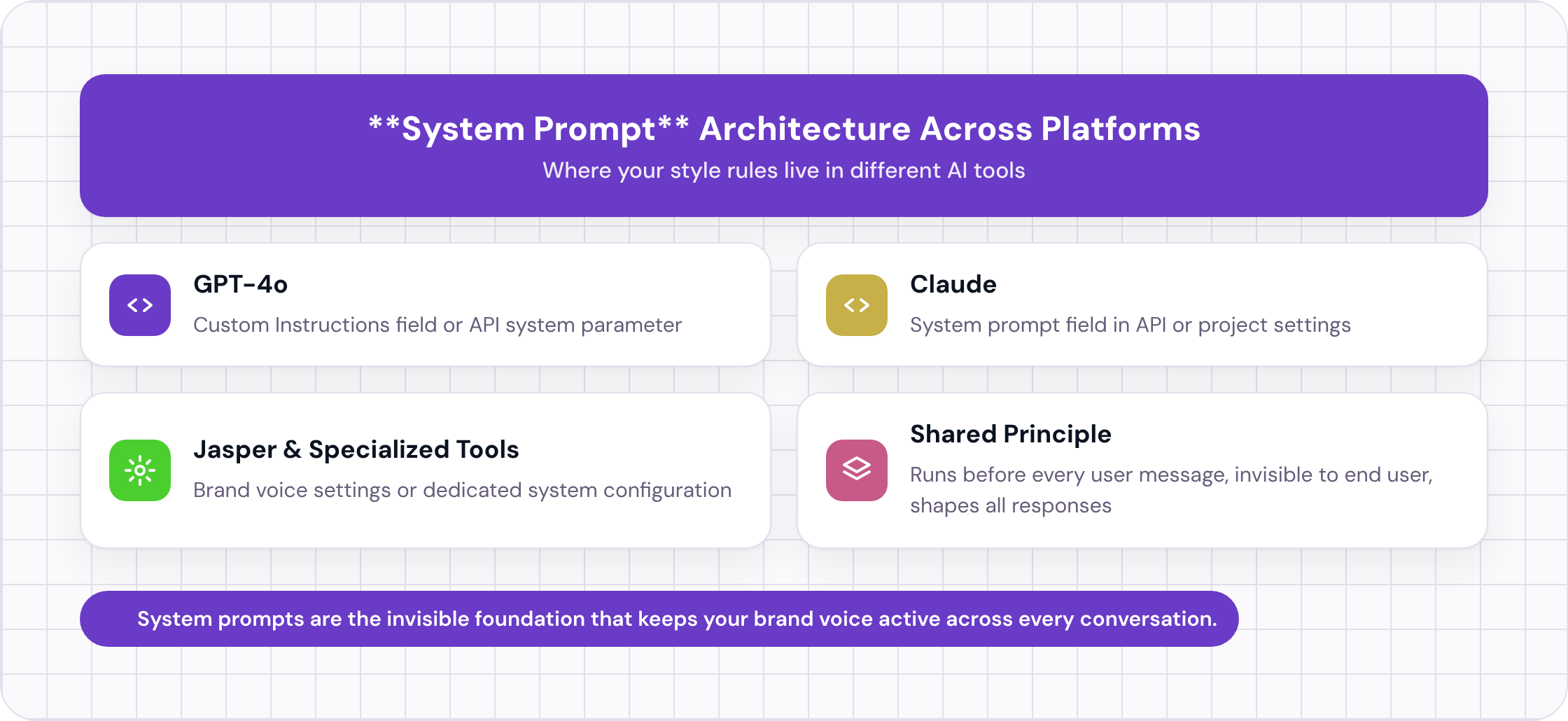
A persistent system prompt is the foundational layer that keeps your style rules active across every conversation and every writer. It lives in the tool's system configuration, not in the chat window, so your brand voice stays locked in regardless of which session a writer opens or when they return to the tool. Without this layer, style training collapses the moment a new conversation starts.
What a System Prompt Is and Where It Lives
A system prompt is a set of instructions that runs before every user message in a conversation. It is invisible to the end user in most interfaces, but it shapes every response the model generates. In GPT-4o, you access it through the "Custom Instructions" field or through the API's system parameter. In Claude, it is the system prompt field in the API or the equivalent in Claude.ai's project settings.
The system prompt is where your machine-readable style guide lives permanently. Every session starts with those rules already loaded. No re-pasting, no relying on a writer to remember to include the style block.
Structuring the System Prompt for Style Consistency
A well-structured system prompt for style training has three components in this order:
- Role definition: tell the model what it is ("You are a content writer for [Brand]. You follow the style rules below for every piece of content you produce.")
- Style rules block: your machine-readable guide from Step 2
- Reference anchors: two or three short excerpts from your voice sample library, labeled as examples of correct output
Keep the total system prompt under 2,000 words if possible. Longer prompts are not always better. Models weight earlier instructions more heavily than later ones, and a bloated system prompt can cause the model to lose track of rules buried near the end. If your full style guide exceeds 2,000 words, summarize the lower-priority rules and link to the full document in a knowledge base attachment instead.
Tool-Specific Setup
For GPT-4o via ChatGPT: use the Custom Instructions field (Settings > Personalization > Custom Instructions). Paste your role definition and style rules into the "How would you like ChatGPT to respond?" field. This persists across all conversations in that account.
For Claude via Claude.ai Projects: create a Project, paste your system prompt into the Project Instructions field. Every conversation within that project inherits the instructions.
For API-based workflows: pass your style guide as the system parameter in every API call. If you are building a content tool on top of the API, this is the most reliable method because it is programmatic and cannot be accidentally omitted.
For tools like Jasper or Writer: both have native brand voice and style guide fields. Upload your machine-readable guide directly. These tools are purpose-built for this use case and handle the persistence layer for you, though they offer less flexibility than a raw API setup.
Step 5: Build an Audit Loop to Catch Drift
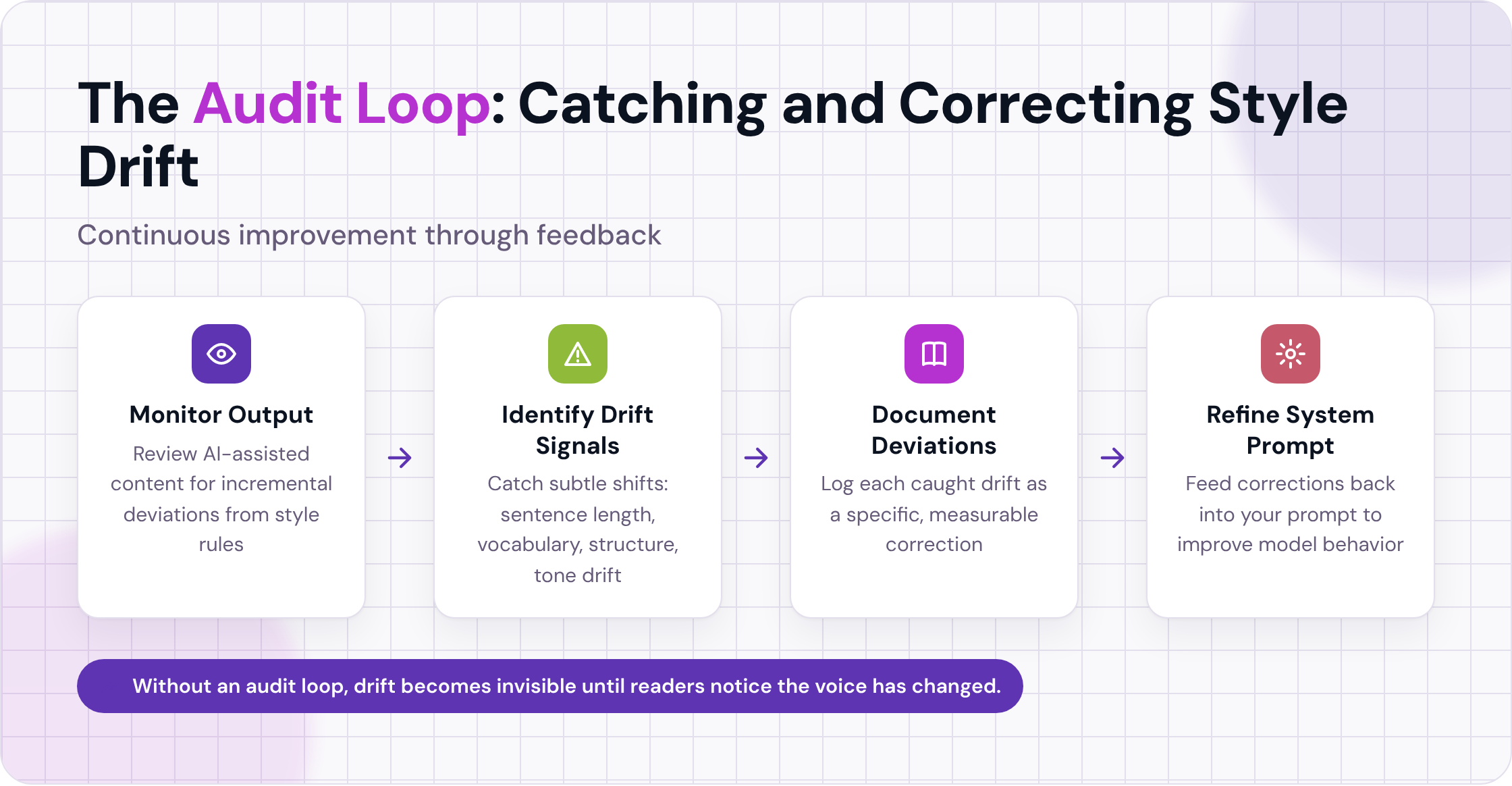
Even with a persistent system prompt, models gradually shift away from your style rules through small, incremental deviations that accumulate over time. An audit loop is a structured process for catching these shifts before they reach publication, then feeding corrections back into your system prompt so it improves rather than degrades. Without this feedback mechanism, drift becomes invisible until readers notice the voice has changed.
What Drift Looks Like in Practice
Drift is rarely dramatic. The model does not suddenly write in a completely different voice. It shifts incrementally: a slightly longer average sentence length, a few vocabulary substitutions, a structural pattern that was not in your guide but appeared in the model's training data.
The practical signal is when a piece of AI-assisted content passes your editor's review but still feels slightly off. That feeling is usually drift. The editor approved it because nothing was technically wrong, but the cumulative effect of small deviations moved the piece away from your brand voice.
Building a Drift Checklist
A drift checklist is a one-page document your editors use to evaluate AI output against your style guide. It is not a comprehensive style review. It is a targeted scan for the specific failure modes most likely to appear.
Structure it around your highest-risk style elements: the ones where AI enforcement reliability is medium or low (see the table in Step 2). For most brands, that means tonal register, sentence rhythm, and any brand-specific vocabulary that is not on a simple preferred/forbidden list.
A practical checklist for a technical-casual brand might look like this:
- Average sentence length: under 20 words per sentence on average?
- Passive voice: fewer than two instances per 500 words?
- Vocabulary: no instances of [list your top 10 forbidden terms]?
- Paragraph length: no paragraph exceeds four sentences?
- Opening sentence: does it lead with the point, not with context?
- Tone: does it read as direct and specific, or hedged and general?
Run this checklist on every piece of AI-assisted content for the first 90 days. After that, you will have enough data to know which checks catch real problems and which are noise. Trim the checklist to the checks that actually fire.
Feeding Corrections Back into the System
When the checklist catches a deviation, do not just fix the piece and move on. Document the deviation in a running log: what the model produced, what the correct version looks like, and which style rule was violated.
Every quarter, review the log and update your system prompt to address the most frequent deviations. If the model consistently writes "utilize" instead of "use" despite the rule being in your guide, the rule is probably buried or phrased ambiguously. Move it higher in the prompt and make it more explicit.
This quarterly review is the maintenance cost of the system. It takes two to three hours per quarter for most teams. Skip it, and drift accumulates until the AI output is noticeably off-brand. Do it consistently, and the system improves over time rather than degrading.
Step 6: Handle Multi-Tool and Multi-Writer Environments
Most teams do not use a single AI tool. Writers use ChatGPT for drafting, Grammarly for editing, Jasper for ad copy. Each tool has its own context window, its own system prompt layer (or lack of one), and its own defaults. Training your style guide into one tool does not automatically carry over to the others.
Creating a Portable Style Package
The solution is a portable style package: a single source-of-truth document that contains your machine-readable style guide, your voice sample excerpts, and your role definition, formatted so it can be pasted into any tool's system prompt field with minimal adjustment.
Keep it in a shared document your whole team can access. Version it. When you update the style guide, update the package and note the date. Writers should always pull from the current version, not from a saved copy they made six months ago.
Coordinating Across Writers
The bigger challenge in multi-writer environments is human behavior, not tool configuration. Writers develop their own prompt habits. They add personal instructions on top of the shared style package, or they skip the package entirely when they are in a hurry.
The practical fix is to make the style package the default, not an optional add-on. If your team uses a shared AI tool with a team-level system prompt (Writer and Jasper both support this), configure the style package at the team level so individual writers cannot accidentally bypass it. If your team uses individual accounts, build a simple onboarding checklist that includes "configure your system prompt using the current style package" as a required step.
You will still get variation. Different writers prompt differently, and the model responds to those differences. The goal is not perfect uniformity. It is a consistent enough baseline that the editorial review catches the remaining variation without becoming a full rewrite.
Frequently Asked Questions
Does this work with free versions of ChatGPT or Claude?
Free-tier ChatGPT does not include persistent Custom Instructions in all regions, and the context window is smaller, which limits how much of your style guide you can load at once. Claude's free tier supports system prompts in Projects, but with shorter context limits than the paid API. For production use across a team, the paid tiers of either tool are worth the cost specifically because of the persistent instruction layer. The free tiers are adequate for testing your style package before committing to a setup.
How long should my system prompt be?
Aim for 800 to 1,500 words for the style rules section. Below 800 words, you are probably leaving important rules out. Above 1,500 words, you risk the model underweighting rules that appear late in the prompt. If your full style guide is longer, summarize the lower-priority sections and store the full version in a knowledge base attachment the model can reference when needed.
What if my brand voice is hard to define?
Start with what you can define concretely: sentence length, forbidden phrases, vocabulary preferences, formatting rules. Those mechanical constraints will get you 60 to 70% of the way there. For the remaining voice qualities that resist definition, rely more heavily on your voice sample library and less on explicit rules. The model will pattern-match against good examples even when it cannot follow a rule that does not exist yet.
How often should I update the system prompt?
Quarterly is the minimum for most teams. If you publish high volume (more than 20 AI-assisted pieces per month), monthly reviews catch drift earlier and keep corrections smaller. The trigger for an unscheduled update is when your drift checklist starts catching the same deviation three or more times in a row. That pattern means the system prompt needs a targeted fix, not just a piece-level correction.
Can I use this approach with image or video script content?
The core approach transfers, but the style rules need to adapt to the format. For video scripts, sentence length targets matter less than spoken rhythm and cue structure. For image captions, brevity and vocabulary rules are the highest-leverage constraints. Build a separate style package for each content format rather than trying to make one document cover everything. The shared elements (vocabulary preferences, forbidden phrases, brand register) can live in a master document that each format-specific package inherits from.
What is the biggest mistake teams make when setting this up?
Skipping the voice sample library and relying on rules alone. Rules tell the model what to avoid. Examples show it what to aim for. Without examples, the model fills the gap between your rules with its own defaults, which are trained on a much broader corpus than your brand. Teams that invest in curating 5 to 10 strong reference samples consistently report better first-draft quality than teams that spend the same time writing more rules.
Putting It Together
Training a content style guide into AI writing tools is a systems problem, not a prompting problem. The five layers here (machine-readable rules, voice samples, persistent system prompts, audit checklists, and feedback loops) work together. Any one of them alone produces marginal improvement. All five together produce AI output that holds your brand voice across sessions, writers, and tools with enough consistency that editorial review becomes a quality check rather than a rewrite.
The quarterly maintenance pass is the part most teams underestimate. The system degrades without it. With it, the system improves as your log of caught deviations becomes a progressively more specific set of prompt refinements.
If you want help building this kind of answer-engine-optimized content infrastructure, visit Seorav's AEO service page to see how they approach it.
Keep reading
Writing Content That AI Tools Actually Want to Cite
Learn how ai tools for generating content optimized for ai search citations work, and structure your pages so AI engines extract and quote them reliably.
Why ChatGPT Quotes Some Paragraphs and Ignores Others
Learn what makes a paragraph quotable by ChatGPT: self-containment, factual density, and authority signals that determine whether AI cites or skips your co
Ranking in Google's AI Search: The Deterministic Signals That Actually Move the Needle
Learn how do you rank in SGE with the three signals Google's AI uses to cite sources: schema markup, entity salience, and structured factual claims.